Files
OmniLottie/README.md
T

378 lines
13 KiB
Markdown
Raw Normal View History

2026-03-01 21:36:54 +08:00
<!-- <div align= "center">
<h1> Official repo for OmniSVG</h1>
</div> -->
<h3 align="center"><strong>OmniLottie: Generating Vector Animations via Parameterized Lottie Tokens
</strong></h3>
<div align="center">
<a href='https://arxiv.org/abs/2504.06263'><img src='https://img.shields.io/badge/arXiv-2504.06263-b31b1b.svg'></a> &nbsp;&nbsp;&nbsp;&nbsp;
<a href='https://openvglab.github.io/OmniLottie/'><img src='https://img.shields.io/badge/Project-Page-Green'></a> &nbsp;&nbsp;&nbsp;&nbsp;
<a href="https://huggingface.co/OmniLottie/OmniLottie"><img src="https://img.shields.io/badge/%F0%9F%A4%97%20Weights-HF-orange"></a> &nbsp;&nbsp;&nbsp;&nbsp;
<a href="https://huggingface.co/datasets/OmniLottie/MMLottie-2M"><img src="https://img.shields.io/badge/%F0%9F%A4%97%20Dataset%20-HF-orange"></a> &nbsp;&nbsp;&nbsp;&nbsp;
<a href="https://huggingface.co/datasets/OmniLottie/MMLottieBench"><img src="https://img.shields.io/badge/%F0%9F%A4%97%20Bench-HF-orange"></a> &nbsp;&nbsp;&nbsp;&nbsp;
<a href="https://huggingface.co/spaces/OmniLottie/OmniLottie"><img src="https://img.shields.io/badge/%F0%9F%A4%97%20Demo%20-HF-orange"></a> &nbsp;&nbsp;&nbsp;&nbsp;
2026-03-01 22:08:21 +08:00
<!-- <a href='https://github.com/OpenVGLab/OmniLottie'><img src='https://img.shields.io/badge/Training-Code-blue?logo=github'></a> -->
2026-03-01 21:36:54 +08:00
</div>
## 🔥🔥🔥 News !!
- [2026/03/02] 👋 Upload paper and init project. [Read](https://arxiv.org/abs/2504.06263)
- [2026/03/02] 👋 We have released the inference code and model weight. 🤗[Weight](https://huggingface.co/OmniLottie/OmniLottie).
- [2026/03/02] We have released **MMLottieBench** benchmark! Check out [MMLottieBench](https://huggingface.co/datasets/OmniLottie/MMLottieBench).
- [2026/03/02] 👋 Release MMLottie-2M Dataser 🤗[MMLottie-2M Dataset](https://huggingface.co/datasets/OmniLottie/MMLottie-2M).
- [2026/03/02] 👋 We have released the Huggingface Demo. 🤗[Demo](https://huggingface.co/spaces/OmniLottie/OmniLottie).
- [2026/02/21] OmniLottie is accepted to **CVPR 2026**🔥! See you in Denver!
<p align="center">
<img src="assets/OmniLottie-main-demo.gif" alt="Demo GIF" width="720px" />
</p>
## 📑 Open-source Plan
- [x] Project Page & Technical Report
- [x] MMLottie-2M Dataset Release
- [x] Inference Code & Model Weight
- [x] Online Demo (Gradio deployed on Huggingface)
- [x] MMLottieBench Benchmark
- [ ] Training Code
## 1. Introduction
**OmniLottie** is the first family of end-to-end multimodal Lottie generators that leverage pre-trained Vision-Language Models (VLMs), capable of generating complex and detailed Lottie animations from multi-modal instructions including texts, images, and videos. We also introduce MMLottie-2M, a multimodal dataset with two million richly annotated Lottie animations, along with a standardized evaluation protocol for multi-modal vector animation generation tasks.
## 2. Models Downloading
| Model | Download link | Size | Update date |
|-----------------------------|-------------------------------|------------|------|
| OmniLottie(4B) | [Huggingface](https://huggingface.co/OmniLottie/OmniLottie) | 8.46 GB | 2026-03-02 |
## 3. Dependencies and Installation
The dependencies configured according to the following instructions provide an environment equipped for inference
### 3.1 Clone the Repository
```bash
git clone https://github.com/OpenVGLab/OmniLottie
cd OmniLottie
```
### 3.2 Create Conda Environment
Create and activate a new conda environment with Python 3.10:
```bash
conda create -n omnilottie python=3.10
conda activate omnilottie
```
### 3.3 Install Dependencies
#### Python Dependencies
We have tested our environment with CUDA 12.1. You can install CUDA 12.1 by following the [CUDA Toolkit installation guide](https://developer.nvidia.com/cuda-12-1-0-download-archive).
Install PyTorch with CUDA 12.1 support:
```bash
pip install torch==2.3.0+cu121 torchvision==0.18.0+cu121 --index-url https://download.pytorch.org/whl/cu121
```
Install remaining dependencies:
```bash
pip install -r requirements.txt
```
## 4. Inference
| | GPU Memory Usage | Time per 256/512/1024/2048/4096 tokens |
| ------------------------------------------------ | ---------------- | ----------------- |
| OmniLottie | 15.2G | 8.34/16.68/33.38/66.74/133.49 seconds |
<font color="red">**Note: The inference time shown here is measured per OmniLottie Lottie tokens, while the inference time reported in our paper is measured per JSON code tokens for fair comparison with baseline methods.**</font>
### Quick Start
**Download Model Weights**
First, install the Hugging Face CLI tool:
```bash
pip install huggingface-hub
```
**Download the model from Hugging Face:**
```bash
# Download OmniLottie model
huggingface-cli download OmniLottie/OmniLottie --local-dir /PATH/TO/OmniLottie
```
**Try with Example Data**
We provide example prompts, images, and videos in the `example/` directory:
```bash
# Test with example text prompts
python inference.py \
--sketch_weight /PATH/TO/OmniLottie \
--batch_text_file example/demo.txt \
--output_dir ./output_demo_text
# Test with example images
python inference.py \
--sketch_weight /PATH/TO/OmniLottie \
--single_image example/demo_images/00de75e2c031cb3fc3f472e356aba5b6.png \
--output_dir ./output_demo_image
# Test with example videos
python inference.py \
--sketch_weight /PATH/TO/OmniLottie \
--single_video example/demo_video/02b8ce2014690a9e30dc25da846e8afb.mp4 \
--output_dir ./output_demo_video
```
### Text-to-Lottie Generation
Generate Lottie animations from text descriptions:
**Single prompt:**
```bash
python inference.py \
--sketch_weight /PATH/TO/OmniLottie \
--single_text "A red ball appearing, bouncing up and down, then fading out, repeating seamlessly" \
--output_dir ./output_text
```
**Batch generation from file:**
```bash
# Create a prompts.txt file with one prompt per line
python inference.py \
--sketch_weight /PATH/TO/OmniLottie \
--batch_text_file example/demo.txt \
--output_dir ./output_text
```
**Custom generation parameters:**
```bash
python inference.py \
--sketch_weight /PATH/TO/OmniLottie \
--single_text "a blue bird appearing, pulsing while sliding downward, lingers briefly, then growing back while sliding upward to reset with clear phase changes, repeating seamlessly" \
--use_sampling \
--temperature 0.8 \
--top_p 0.25 \
--top_k 5 \
--repetition_penalty 1.01 \
--output_dir ./output
```
**Generate with Best-of-N selection:**
```bash
python inference.py \
--sketch_weight /PATH/TO/OmniLottie \
--single_text "a light blue piggy bank with a darker blue outline, with a single light blue coin with a dark blue yen symbol (£) appears above the piggy bank, then starts descending towards the piggy bank's opening" \
--num_candidates 8 \
--output_dir ./output
```
### Text-Image-to-Lottie Generation
Generate Lottie animations from an image:
**Single image:**
```bash
python inference.py \
--sketch_weight /PATH/TO/OmniLottie \
--single_image /path/to/image.png \
--output_dir ./output_image
```
### Video-to-Lottie Generation
Convert video to Lottie animation:
**Single video:**
```bash
python inference.py \
--sketch_weight /PATH/TO/OmniLottie \
--single_video /path/to/video.mp4 \
--output_dir ./output_video
```
### Advanced Options
**Specify tokenizer path:**
```bash
python inference.py \
--sketch_weight /PATH/TO/OmniLottie \
--tokenizer_name /PATH/TO/Qwen2.5-VL-3B-Instruct \
--single_text "Your prompt here" \
--output_dir ./output
```
**Adjust token length:**
```bash
python inference.py \
--sketch_weight /PATH/TO/OmniLottie \
--maxlen 6072 \
--text_len 512 \
--single_text "Your prompt here" \
--output_dir ./output
```
**Filter by task type (when using MMLottieBench dataset):**
```bash
python inference.py \
--sketch_weight /PATH/TO/OmniLottie \
--mmlottie_bench_dir /PATH/TO/mmlottie_bench \
--split real \
--task_filter text \
--output_dir ./output
```
**Process limited samples with shuffling:**
```bash
python inference.py \
--sketch_weight /PATH/TO/OmniLottie \
--mmlottie_bench_dir /PATH/TO/mmlottie_bench \
--split real \
--max_samples 10 \
--shuffle \
--output_dir ./output
```
### Interactive Demo
We provide an interactive generation interface using Gradio:
- **Local Deployment**
```bash
python app.py
```
- **Online Demo**
Try our live demo on [Hugging Face Spaces](https://huggingface.co/spaces/OmniLottie/OmniLottie)
## 5. Benchmark & Evaluation
We provide **MMLottieBench** for standardized evaluation of Lottie generation models.
### Download MMLottieBench
**Option 1: Using download script:**
```bash
python download_mmlottie_bench.py --output_dir /PATH/TO/mmlottie_bench
```
**Option 2: Using Hugging Face CLI:**
```bash
huggingface-cli download OmniLottie/MMLottieBench --repo-type dataset --local-dir /PATH/TO/mmlottie_bench
```
**Option 3: Automatic download (in code):**
```python
from datasets import load_dataset
dataset = load_dataset("OmniLottie/MMLottieBench")
```
### Benchmark Overview
MMLottieBench contains **900 samples** split into:
- **Real split**: 450 real-world Lottie animations
- **Synthetic split**: 450 synthetically generated samples
Each split contains **3 task types** (150 samples each):
- **Text-to-Lottie**: Generate from text descriptions
- **Text-Image-to-Lottie**: Generate from image + text guidance
- **Video-to-Lottie**: Convert video to Lottie animation
### Run Benchmark Inference
MMLottieBench provides two splits that can be switched using `--split`:
- `--split real` - Test on 450 real-world Lottie animations
- `--split synthetic` - Test on 450 synthetically generated samples
**Test on real split (all tasks):**
```bash
python inference.py \
--sketch_weight /PATH/TO/OmniLottie \
--mmlottie_bench_dir /PATH/TO/mmlottie_bench \
--split real \
--output_dir ./benchmark_results_real
```
**Test on synthetic split (all tasks):**
```bash
python inference.py \
--sketch_weight /PATH/TO/OmniLottie \
--mmlottie_bench_dir /PATH/TO/mmlottie_bench \
--split synthetic \
--output_dir ./benchmark_results_synthetic
```
**Test specific task type on real split:**
```bash
python inference.py \
--sketch_weight /PATH/TO/OmniLottie \
--mmlottie_bench_dir /PATH/TO/mmlottie_bench \
--split real \
--mmlottie_task text2lottie \
--output_dir ./benchmark_results
```
**Available task types:**
- `text2lottie` - Text-to-Lottie generation (150 samples per split)
- `text_image2lottie` - Text-Image-to-Lottie generation (150 samples per split)
- `video2lottie` - Video-to-Lottie generation (150 samples per split)
**Process limited samples with filtering:**
```bash
python inference.py \
--sketch_weight /PATH/TO/OmniLottie \
--mmlottie_bench_dir /PATH/TO/mmlottie_bench \
--split real \
--max_samples 50 \
--shuffle \
--output_dir ./benchmark_results
```
For detailed usage, see:
- [MMLottieBench Usage Guide](https://huggingface.co/datasets/OmniLottie/MMLottieBench/blob/main/README.md)
## 6. License
OmniLottie is licensed under the [**Apache License 2.0**](https://www.apache.org/licenses/LICENSE-2.0), while MMLottie-2M dataset is under [**Creative Commons Attribution Non Commercial Share Alike 4.0 License**](https://spdx.org/licenses/CC-BY-NC-SA-4.0). You can find the license files in the respective github and HuggingFace repositories.
## Citation
```bibtex
@article{yang2025omnilottie,
title={OmniLottie: Generating Vector Animations via Parameterized Lottie Tokens},
author={Yiying Yang and Wei Cheng and Sijin Chen and Xianfang Zeng and Jiaxu Zhang and Liao Wang and Gang Yu and Xinjun Ma and Yu-Gang Jiang},
journal={arXiv preprint arxiv:2504.06263},
year={2025}
}
```
## Acknowledgments
2026-03-01 22:48:32 +08:00
We thank the following projects and resources for their valuable contributions:
- **Data Sources**: [LottieFiles](https://lottiefiles.com), [IconScout](https://iconscout.com), [Flaticon](https://www.flaticon.com), [Iconfont](https://www.iconfont.cn), [Icons8](https://icons8.com)
- **[python-lottie](https://github.com/eltiempoes/python-lottie)**: For providing excellent tools for Lottie manipulation and processing
- **[MMSVG-Icon](https://huggingface.co/datasets/OmniSVG/MMSVG-Icon)**, **[MMSVG-Illustration](https://huggingface.co/datasets/OmniSVG/MMSVG-Illustration)**: For inspiring our multi-modal data curation approach
2026-03-01 21:36:54 +08:00
2026-03-01 22:21:22 +08:00
2026-03-01 21:36:54 +08:00
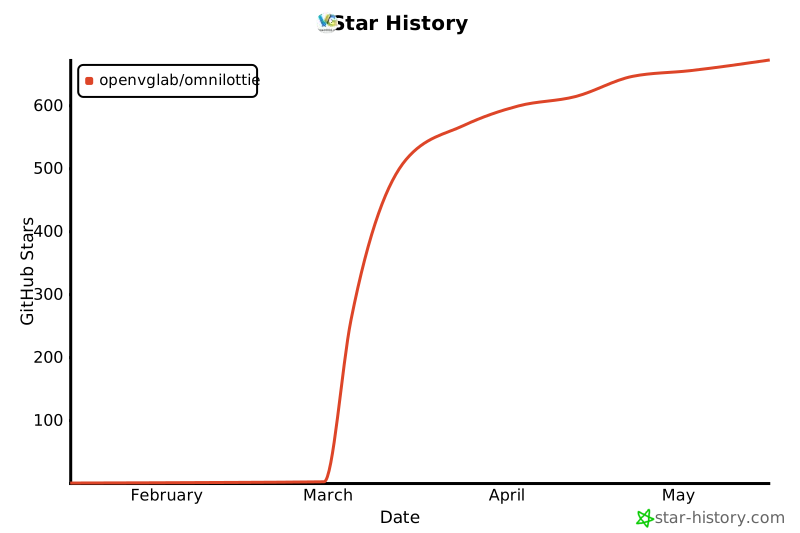
## Star History
[![Star History Chart](https://api.star-history.com/svg?repos=OpenVGLab/OmniLottie&type=Date)](https://www.star-history.com/#OpenVGLab/OmniLottie&Date)